
From the Toronto city-centre reference point at 43.6532, -79.3832, the Qibla is 54.6° clockwise from true north, which is northeast. It is an approximate city centre, not your address; set your own place in the finder on this page.
What this Toronto result represents
From the Toronto preset at 43.6532, -79.3832, the Qibla bearing is 54.6° and the distance is 10,496 km. Both numbers belong to that approximate city-centre point. They are not your GPS position, a measurement of a wall in your building or a value for every Toronto address. For a home, office or hotel, use your device location or that place’s coordinates in the finder.
The bearing is a spherical initial great-circle bearing, measured clockwise from true north. It shows the direction in which the shortest route over a sphere leaves the preset. The distance uses the same sphere, with an Earth radius of 6371.0088 km. The destination is the Kaaba reference point at 21.4225241, 39.8261818. It comes from a published computational reference that falls within the mapped Kaaba footprint, and this project has not surveyed it independently. The result is geographic guidance, not a religious ruling.
Why the initial direction is northeast
On a common north-up Web Mercator map, Makkah sits lower and to the right of Toronto. A straight line drawn across the screen therefore points southeast. The shorter great-circle route actually leaves Toronto at 54.6°, which is northeast. On that kind of map the route appears as a curve that heads northeast first. The finder’s map plots it from points sampled along the great circle.
The curve does not change the starting direction. Face the angle at your starting point, and do not follow the shape of the line across the map. For the geometry, read why the route starts northeast. For a wider look at the effect, see why Qibla routes curve on maps.
Globe
Mercator view
Great-circle routeStraight screen line
Apply the bearing in your surroundings
- Check that the point shown in the finder is the place you mean. If you changed it or opened a shared link, use the finder’s bearing instead of the fixed 54.6° city-centre reference.
- Find true north from a trusted reference.
- Turn clockwise from true north to that bearing (54.6° in the Toronto city-centre example). The number gives a direction only. It does not pick out a wall or check which way you are facing.
- On a supported phone, you can select Enable live compass. Hold the phone flat or nearly level, with the screen in portrait orientation. Live alignment pauses in landscape, or when the phone tilts more than about 5°. The finder applies its own magnetic correction to the phone’s heading. It never treats a heading without a known absolute reference as true north. With the compass off, the arrow shows a still, north-up bearing and not a live heading.
Some arrow movement is normal while you turn. If the arrow jumps while the phone is still, check for a magnetic case or nearby metal, and check how you are holding the phone. See help with a changing arrow. These factors affect the phone’s heading, not the calculated bearing.
Using a separate compass
First check whether your compass reads magnetic north or true north. If it reads true north, use the calculated bearing as it is, with no correction. On an unadjusted magnetic compass, subtract the local declination from the true bearing. If the result falls outside 0–360°, add or subtract 360° to bring it back into that range:
Magnetic target = true bearing − declination (east declination counts as positive)
Here is a hypothetical example, which is not Toronto’s declination. With a declination of 5° east, 54.6° true becomes 49.6° on an unadjusted magnetic compass. You add the declination only when you convert a measured magnetic heading to true. You never add it when you set the target. Apply one correction only.
Declination varies with place and date. Check a current source such as NOAA’s World Magnetic Model, or follow the steps to apply the bearing with a separate compass. The finder’s own correction uses WMM2025, which is valid in this finder until 13 November 2029 at 03:00 UTC. After that date the finder stops applying magnetic correction, so live alignment is not shown. If your point has a valid bearing, you can still use it with another north reference, along with the optional map if it loads. The expiry does not change the cases where no bearing is shown at all, such as points very close to the Kaaba reference.
Keep the reference tied to its location
The Toronto panel above the finder always shows the city-centre preset. If you choose another city, use your device location or the map centre, or open a shared link, only the finder changes. Opening this page does not save Toronto as your location or tick Remember this location on this device. Reset finder clears the active point but does not erase a location saved earlier. To remove a stored point, use Clear saved location or untick Remember. If the finder reports that it could not remove the point, clear this site’s data in your browser settings.
The map loads OpenStreetMap tiles only when you open it. Loading those tiles discloses your IP address and the area you view. A Share location link carries the coordinates, the label and any position uncertainty, and anyone with the link can read them. Read about sharing a precise location before you send one.
Position uncertainty is a radius in metres. It does not measure heading accuracy. A value reported by your browser is a 95% confidence radius. A value you type in or receive in a link is not automatically one. A blank value does not mean zero error.
Keep a reference for this city
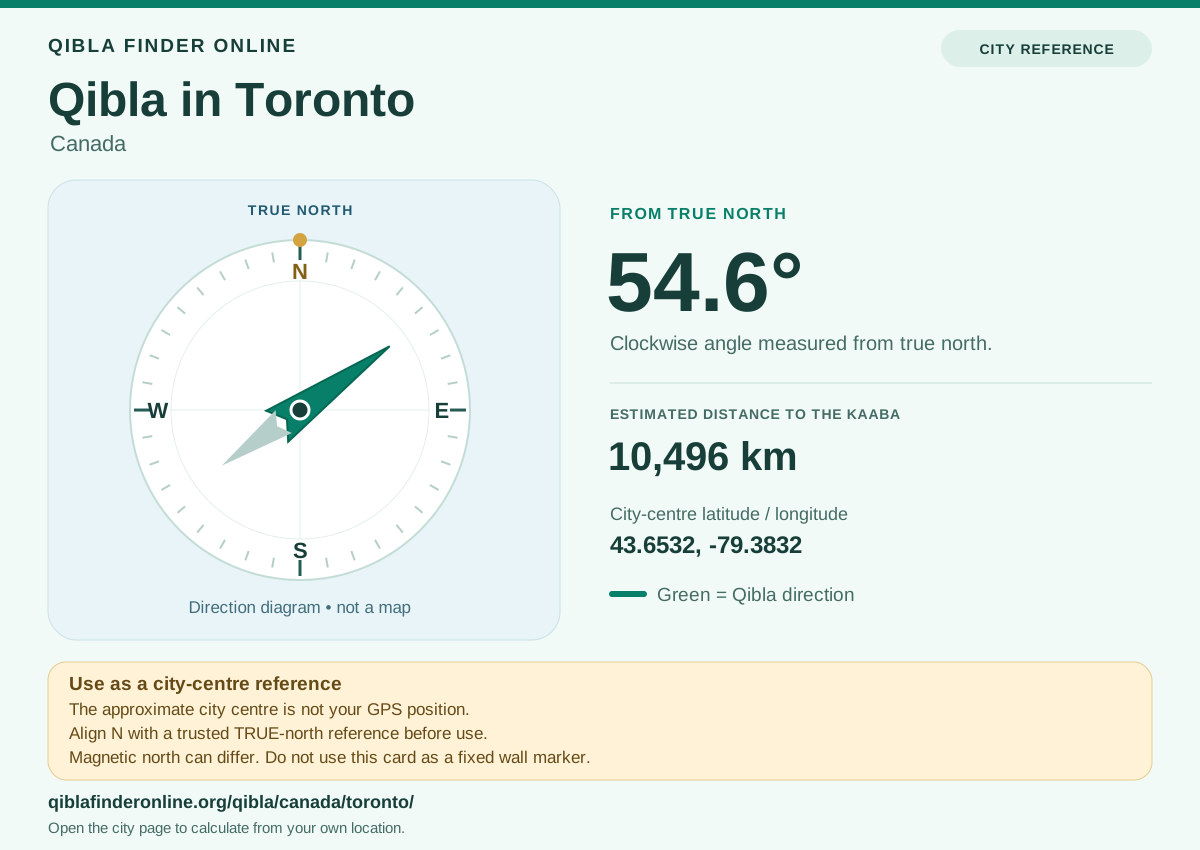
The Toronto reference card is a fixed SVG image. It shows the city-centre coordinates, 54.6°, 10,496 km and true-north guidance. It is not a live reading or a verified marker for your room.
The card cannot align itself. Before you read the angle, line up its N with a trusted true-north reference. For any other location, use that location’s own result.
Questions about Qibla from Toronto
What is the Qibla direction from Toronto?
From the Toronto preset at 43.6532, -79.3832, the Qibla is 54.6° clockwise from true north, which is northeast. The spherical distance is 10,496 km. For a particular address, recalculate in the finder.
Does this page know where I am in Toronto?
No. The page starts from the city preset. The finder asks for your device location only once, after you tap Use my location and grant permission. A shared link’s city or coordinates replace the preset in the finder, but the fixed panel still shows Toronto.
Which side is the Qibla direction?
From Toronto, the Qibla is to the northeast. A flat map makes it look southeast, as explained in why the initial direction is northeast. Find true north first, then turn clockwise to the bearing. A different starting point can put the Qibla on a different side.
What direction is Qibla right now?
The bearing for a fixed point does not change with the time of day. It changes only when the starting point changes. A live phone heading moves as you turn, and the finder’s magnetic correction depends on the model’s validity date. See how to apply the bearing.
Why does my compass or another app show a different direction?
The usual causes are a different starting point, a different Kaaba reference point, or confusion between magnetic and true north. We have not checked other tools’ values. Phone cases, nearby metal and the way you hold the phone can also disturb the sensors. See help with a changing arrow.